•
16 min read
Using Laravel Filament

### Table of Contents
  • [Step 2 - Roles Permissions](#mcetoc_1gf9c08qph) - [Custom command](#mcetoc_1gf9c08qpi) - [Filament Plugins](#mcetoc_1gf9c08qpj) - [Settings Package](#mcetoc_1gf9c08qpk)
  • [Step 3 - JSON API](#mcetoc_1gf9c08qpm) - [Hero API end points](#mcetoc_1gf9c08qpn)
  • ---

    If you just wish to learn about Filament, please read their documentation and check their demo repo. It will be faster than following my post.

    Intro

    I have used quite a few admin or CRUD generator kind of Laravel packages for rapid development in the past. Filament is youngest among them but it has quite a lot of things that I like about.

    • open-source and free (unlike Nova or Backpack)
    • stay in Laravel ecosystem; TALL stack (unlike Orchid)
    • good documentation and active community
    • enough form fields to use for any type of project
    • easy to use table with filter, sorting
    • good support for Eloquent’s relationships
    • come with navigation, pages, widgets, charts and notifications
    • plenty of plugins (not hundreds or thousands, still pretty good amount)
    • mainly it is easy to learn thanks to the documentation, demo project repo and existing plugins

    So I have decided to use Filament for my future Laravel projects. This post is my journal/guide/log/notes of my learning and experimenting with Filament. My aim is to use Filament together with other packages I normally use. So my project will have other packages for APIs development, APIs integration, deployment, logging and so on. (I have trouble installing Laravel Module package so I have removed it for now. I will try to install it again and use Filament from Module in future.)

    I have setup a Github repo mrlinnth/laravel-filament-starter for my project. If you are someone who prefer to read code instead of text, feel free to visit there instead. I update the README file with short to the point steps that I did.

    I am gonna skip the followings in this post 

    • Setting up local environment for Laravel project on different OS
    • Setting up VS Code for Laravel project on different OS
    • Installing and setting up Laravel packages that I usually use

    I am not even going to write about installing and setting up Filament. If you are using my repo then it’s already installed. I plan to write separate posts for those how to setup topics in future.

    If you want to read and follow this post, you will need to 

    1. clone my repo mrlinnth/laravel-filament-starter
    2. checkout related branch for each step
    3. update .env with your DB info
    4. run composer install
    5. run npm install
    6. run php artisan migrate
    7. run php artisan optimize

    Step 1 - First CRUD

    Branch : steps/01-first-crud

    First I want to learn how to develop CRUD pages. I also want to see how Filament handles relationships. I decided to develop a superherodb.com inspired project since I am bored with Blog project.

    Requirements

    • User can create and update heroes.
    • A hero can have many skills.
    • A hero can belong to teams.
    • A hero can be a leader of a team.

    When I have requirements, I decide a DB structure
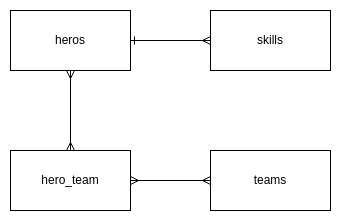
    heros-skills-teams

    Project Initiate

    Generate model, factory, migration and seed files

    php artisan make:model -fms Hero

    php artisan make:model -fms Skill

    php artisan make:model -fms Team

    Generate pivot table migration for hero_team

    php artisan make:migration create_hero_team_table 

    Update the migration files

          Schema::create(‘heroes’, function (Blueprint $table) {             $table->id();             $table->string(‘name’); // text             $table->text(‘history’); // textarea             $table->string(‘species’); // dropdown             $table->string(‘gender’); // radio button             $table->integer(‘age’); // number             $table->string(‘eye_color’); // color picker           $table->json(‘traits’); // group of checkbox             $table->timestamps();       });

            Schema::create(‘skills’, function (Blueprint $table) {             $table->id();             $table->string(‘name’); // text             $table->foreignId(‘hero_id’)->constrained(); // dropdown             $table->integer(‘power’)->default(50); // number             $table->timestamps();         });

            Schema::create(‘teams’, function (Blueprint $table) {             $table->id();           $table->string(‘name’); // text           $table->text(‘story’); // wysiwyg or rich text editor             $table->foreignId(‘leader_id’)                     ->constrained(‘heroes’)                     ->onUpdate(‘cascade’)                     ->onDelete(‘cascade’);             $table->timestamps();         });

            Schema::create(‘hero_team’, function (Blueprint $table) {             $table->id();             $table->foreignId(‘hero_id’)->constrained();             $table->foreignId(‘team_id’)->constrained();             $table->timestamps();         });

    I write down the form field type so that I don't have to think when I setup CRUD form later.

    Run Migrate

    php artisan migrate

    Hero has species and traits attributes. They will be predefined but instead of hard coding them directly at form fields we can use Enum class. Spatie Laravel Enum package is very useful.

    Generate and update Enum classes

    php artisan make:enum SpeciesEnum

    /**  * @method static self human()  * @method static self alien()  * @method static self god()  * @method static self robot()  * @method static self mutant()  * @method static self other()  */ final class SpeciesEnum extends Enum { } php artisan make:enum TraitsEnum

    /**  * @method static self intelligence()  * @method static self strength()  * @method static self speed()  * @method static self durability()  * @method static self power()  * @method static self combat()  */ final class TraitsEnum extends Enum { }

    **Update models with casts and relationship methods**

    Hero.php

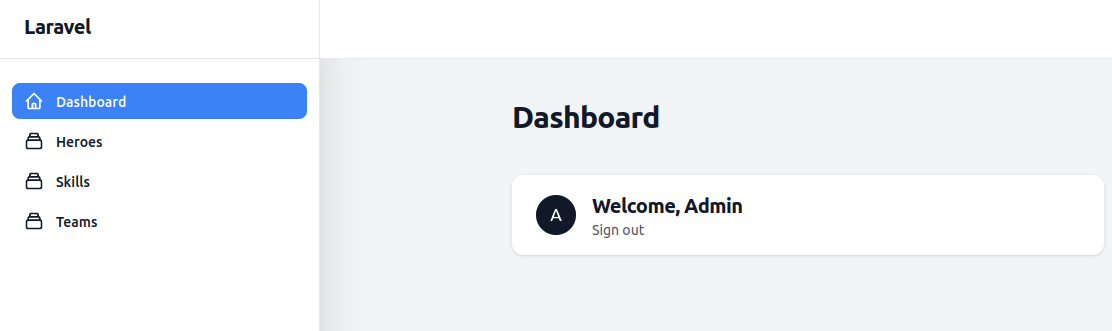
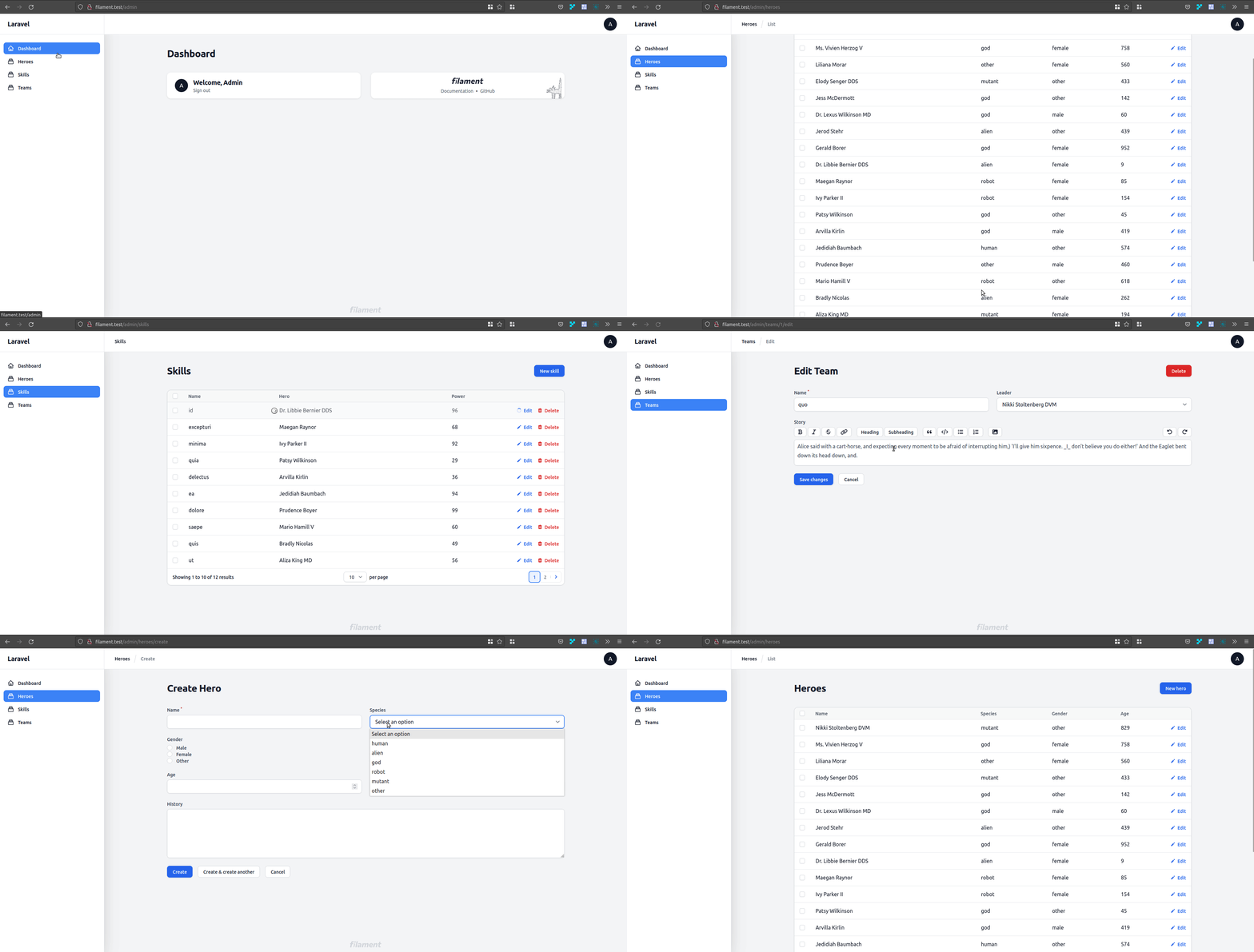
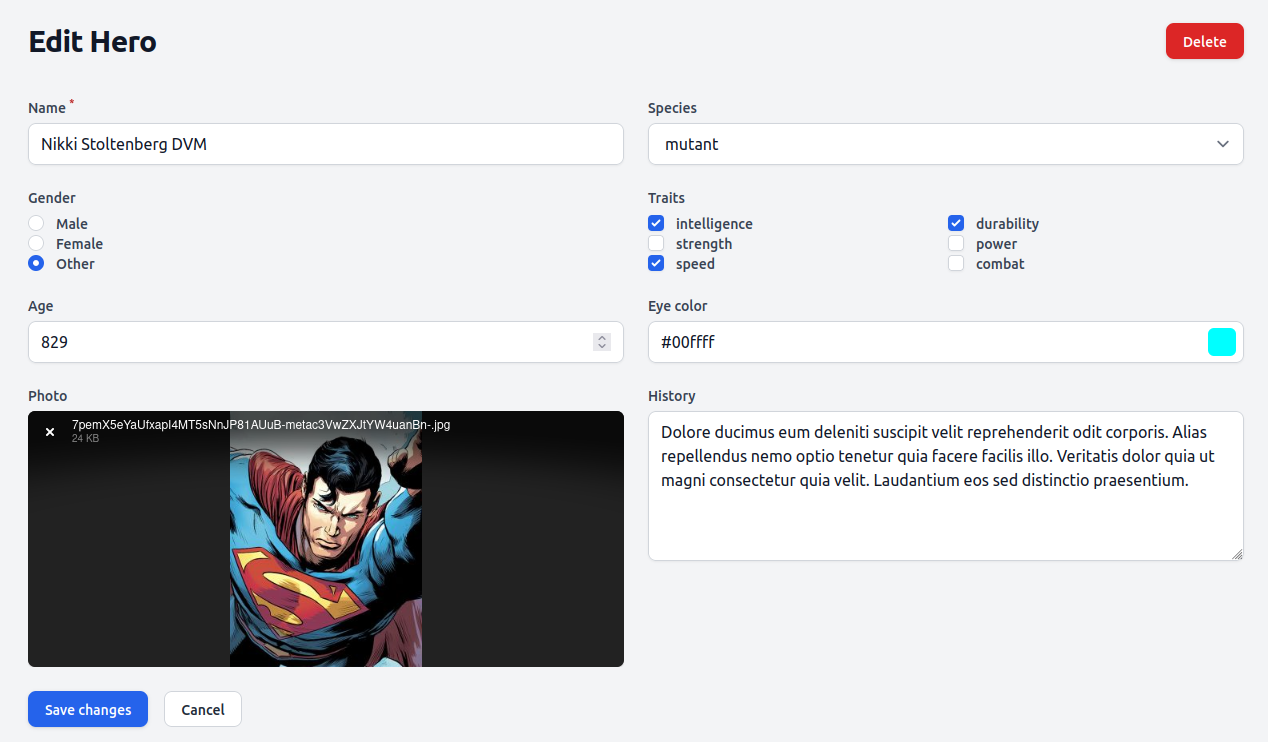
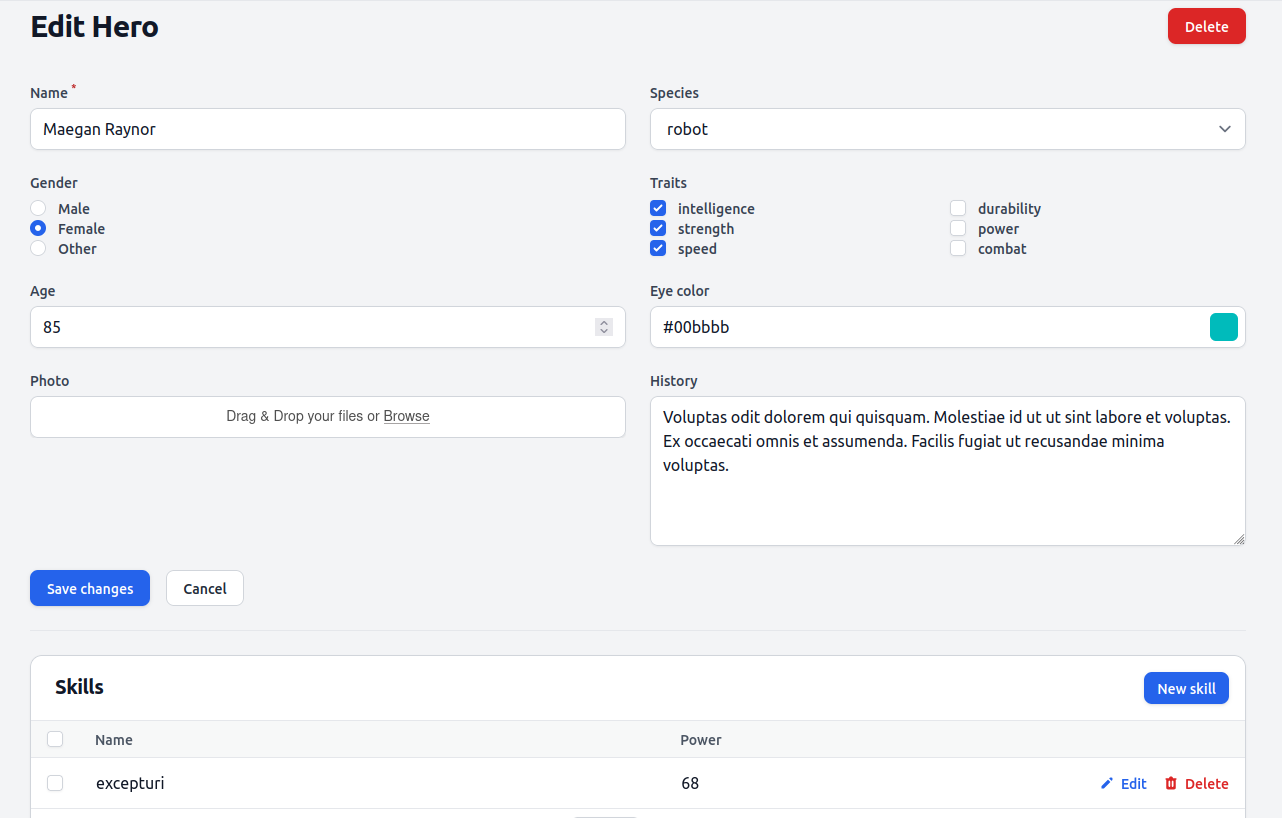
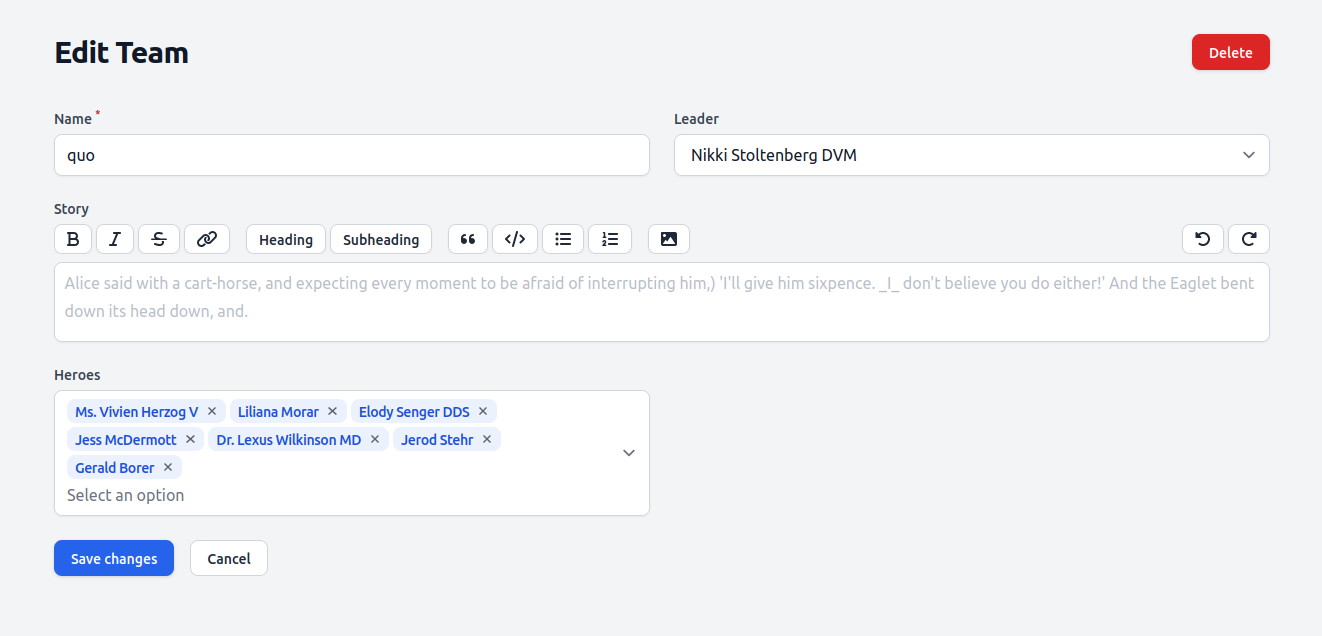
    SpeciesEnum::class,         'traits' => TraitsEnum::class.':collection,nullable',     ];     /**      * The attributes that aren't mass assignable.      *      * @var array      */     protected $guarded = [];     /**      * Get the skills of the hero.      */     public function skills()     {         return $this->hasMany(Skill::class);     }     /**      * The teams that belong to the hero.      */     public function teams()     {         return $this->belongsToMany(Team::class);     }     /**      * Get the teams the hero is leader of.      */     public function leaderTeams()     {         return $this->hasMany(Team::class, 'leader_id');     } } Skill.php belongsTo(Hero::class);     } } Team.php belongsToMany(Hero::class);     }     /**      * Get the leader that owns the team.      */     public function leader()     {         return $this->belongsTo(Hero::class, 'leader_id');     } } ## Generate CRUD **Filament resources** Filament provide 3 options for generating CRUD. Filament address entity/model as resource so I will follow. 1. default : You will need to define the form fields for create and edit pages and table columns for listing page. Create and edit form is separate page. Delete button is not showing at listing page. 2. simple : You still need to define the form fields and table columns. Create and edit form is a modal box now. Delete button exists at listing page. Good for resource with 2,3 small attributes. Not suitable for resource with many attributes or long text attribute. 3. generate : Form fields and table columns are auto generated. The rest is same as default. Useful if majority of the attributes are common type (eg: text, number). You won't need to create everything from scratch. You just need to update the generated code as you want. You need doctrine/dbal package for this. `php artisan make:filament-resource Hero`     public static function form(Form $form): Form     {         return $form             ->schema([                 Forms\Components\TextInput::make('name')->required(),                 Forms\Components\Select::make('species')                 ->options(SpeciesEnum::toArray()),                 Forms\Components\Radio::make('gender')                 ->options([                     'male' => 'Male',                     'female' => 'Female',                     'other' => 'Other'                 ]),                 Forms\Components\CheckboxList::make('traits')                 ->options(TraitsEnum::toArray())                 ->columns(2),                 Forms\Components\TextInput::make('age')->numeric(),                 Forms\Components\ColorPicker::make('eye_color'),                 Forms\Components\Textarea::make('history')->columnSpan('full'),             ]);     }     public static function table(Table $table): Table     {         return $table             ->columns([                 Tables\Columns\TextColumn::make('name'),                 Tables\Columns\TextColumn::make('species'),                 Tables\Columns\TextColumn::make('gender'),                 Tables\Columns\TextColumn::make('age'),             ])             ->filters([                 //             ])             ->actions([                 Tables\Actions\EditAction::make(),             ])             ->bulkActions([                 Tables\Actions\DeleteBulkAction::make(),             ]);     } `php artisan make:filament-resource Skill --simple`     public static function form(Form $form): Form     {         return $form             ->schema([                 Forms\Components\TextInput::make('name')->required(),                 Forms\Components\Select::make('hero_id')->relationship('hero', 'name'),                 Forms\Components\TextInput::make('power')->numeric(),             ]);     }     public static function table(Table $table): Table     {         return $table             ->columns([                 Tables\Columns\TextColumn::make('name'),                 Tables\Columns\TextColumn::make('hero.name'),                 Tables\Columns\TextColumn::make('power'),             ])             ->filters([                 //             ])             ->actions([                 Tables\Actions\EditAction::make(),                 Tables\Actions\DeleteAction::make(),             ])             ->bulkActions([                 Tables\Actions\DeleteBulkAction::make(),             ]);     } `php artisan make:filament-resource Team --generate`     public static function form(Form $form): Form     {         return $form             ->schema([                 Forms\Components\TextInput::make('name')->required(),                 Forms\Components\Select::make('leader_id')->relationship('leader', 'name'),                 Forms\Components\RichEditor::make('story')->columnSpan('full'),             ]);     }     public static function table(Table $table): Table     {         return $table             ->columns([                 Tables\Columns\TextColumn::make('name'),                 Tables\Columns\TextColumn::make('leader.name'),             ])             ->filters([                 //             ])             ->actions([                 Tables\Actions\EditAction::make(),             ])             ->bulkActions([                 Tables\Actions\DeleteBulkAction::make(),             ]);     } - I update the generated fields and columns as I like. - I use `columnSpan('full')` method for the long text fields. - Skill and Team resources have hero as select drop down for the relationship. - Skill table actions() method has DeleteAction. So if we add it to other two resource, they will also show delete action at listing page. - Hero resource has radio buttons, checkbox group, color picker. - Team has rich text (wysiwyg) editor. You should be able to create, edit, delete the resources. But you will need to create user to login and access Filament admin dashboard. Or use my dummy data it already has test user account. **Create user** `php artisan make:filament-user` and enter details Visit yourdomain/admin and login. You should see this. ![filament-dashboard](https://yanlinnthor.github.io/media/posts/15/2022-09-29_01-59.png) **Dummy data** I use Laravel's Factory and Seeder classes. I update the HeroFactory, SkillFactory and TeamFactory.  I update TeamSeeder and SkillSeeder. Since TeamFactory will also generate Heroes, I don't use HeroSeeder. I update DatabaseSeeder with test user and call TeamSeeder and SkillSeeder. Run `php artisan migrate:fresh --seed` to clear the database, run migrations and seeders. Visit yourdomain/admin and login - username : [admin@mail.com](mailto:admin@mail.com) - password : password You will see dummy data records for heroes, skills and teams. ![filament-with-dummy-data](https://yanlinnthor.github.io/media/posts/15/Peek-2022-09-29-02-13.gif) ## File upload Let's upload a photo for hero resource. With the help of Spatie Media Library package and Filament Media Library plugin package, we do not need to update hero table structure or anything. To add file upload field to hero create/edit form, update `form()` method `$form->schema` parameter array in `HeroResource.php` with following Forms\Components\SpatieMediaLibraryFileUpload::make('photo') ->collection('hero'), It is better to define `collection()` parameter, since it is how we will associate the uploaded file with our resource. To show the image in table column, update `table()` method `$table->columns` parameter array in `HeroResource.php` with following Tables\Columns\SpatieMediaLibraryImageColumn::make('photo') ->collection('hero'), ![file-upload](https://yanlinnthor.github.io/media/posts/15/2022-10-01_10-46.png) ![image-column](https://yanlinnthor.github.io/media/posts/15/2022-10-01_10-45.png) ## Relationships **One to many relationship** Hero and skill have one to many relationship. Since a skill can only belong to one hero, we need to select hero when a skill is created. Relationship name is `hero` and foreign key column is `hero_id`. Same with Hero and Team. A team can only have one hero as leader so we need to select leader when creating a team. Relationship name is `leader` and foreign key column is `leader_id`. Necessary codes are already added in previous step while updating the generated resource files. In `SkillResource.php` Forms\Components\Select::make('hero_id')->relationship('hero', 'name'), In `TeamResource.php` Forms\Components\Select::make('leader_id')->relationship('leader', 'name'), To show relationship object's attribute in table, you can just use relationship method name with `.` dot notation. Check the leader name column in `TeamResource.php`. It is not very convenient for user to create hero and then create many skills for the hero one by one at different page. Creating all the skills of the hero while creating the hero provides a better user experience. We can use Filament relation manger feature for that. We will need skill relation manager for the hero resource. **Relation manager** `php artisan make:filament-relation-manager HeroResource skills name` class SkillsRelationManager extends RelationManager {     protected static string $relationship = 'skills';     protected static ?string $recordTitleAttribute = 'name';     public static function form(Form $form): Form     {         return $form             ->schema([                 Forms\Components\TextInput::make('name')                     ->required()                     ->maxLength(255),                 Forms\Components\TextInput::make('power')->numeric(),             ]);     }     public static function table(Table $table): Table     {         return $table             ->columns([                 Tables\Columns\TextColumn::make('name'),                 Tables\Columns\TextColumn::make('power'),             ])             ->filters([                 //             ])             ->headerActions([                 Tables\Actions\CreateAction::make(),             ])             ->actions([                 Tables\Actions\EditAction::make(),                 Tables\Actions\DeleteAction::make(),             ])             ->bulkActions([                 Tables\Actions\DeleteBulkAction::make(),             ]);     } } After generating and updating the relation manager, we need to update `getRelations()` method of hero resource as well.     public static function getRelations(): array     {         return [             RelationManagers\SkillsRelationManager::class,         ];     } A skills table and new skill button will appear at hero create/edit form. ![relation-manager](https://yanlinnthor.github.io/media/posts/15/2022-10-01_10-21.png) **Many to many relationship** Team and hero have many to many relationship. We can either - add hero to one or more teams at hero create/edit form or - assign heroes at team create/edit form I like the later because most of the time we will be creating hero before creating team. We just update `TeamResource.php`  public static function form(Form $form): Form { return $form ->schema([ //...            Forms\Components\MultiSelect::make('heroes') ->relationship('heroes', 'name') ]); }New heroes multi-select field will appear at Team create/edit form  ![many-to-many](https://yanlinnthor.github.io/media/posts/15/2022-10-01_10-02.png) ## View Resource By default Filament doesn't generate view page since we will see all data at edit form anyway. If you want separate view page, you have to mention it during resource generation command. Or run generate view page command for existing resource. I will create own view page for hero resource. **Generate view page and update** `php artisan make:filament-page ViewHero --resource=HeroResource --type=ViewRecord` You will get a new `ViewHero.php` file under `HeroResource\pages\` directory. You need to add the view page to `getPages()` method in `HeroResource.php`     public static function getPages(): array     {         return [             'index' => Pages\ListHeroes::route('/'),             'create' => Pages\CreateHero::route('/create'),             'view' => Pages\ViewHero::route('/{record}'),             'edit' => Pages\EditHero::route('/{record}/edit'),         ];     } Now when you click on a hero record, it will not bring you to edit form. You will still see all attributes in read-only state in form layout.  To design your own custom view page, define `$view` property in `ViewHero.php` and create your own custom blade for the view. class ViewHero extends ViewRecord {     protected static string $resource = HeroResource::class;     protected static string $view = 'filament.resources.heroes.pages.view'; } You can use `$record` variable to get the resource object data in the blade file.    
           
    {{ $record->name }}        


    {{ $record->name }}


    {{ $record->history }}

               
                    @foreach ($record->traits as $trait)                    
    {{ $trait }}
                    @endforeach            
           
       
    And you will get your custom view page for the hero. ![custom-view](https://yanlinnthor.github.io/media/posts/15/2022-10-01_10-49.png) # Step 2 - Roles Permissions *Branch : [steps/02-roles-permissions](https://github.com/mrlinnth/laravel-filament-starter/tree/steps/02-roles-permissions)* Let's add common features that every project has such as roles, permission, log in, register, impersonate, settings, etc. ## Custom command There will be time you found that your database has many unclean data, bad data and want to reset. It is always better to have a command to help you with that. You can reset the database tables, seed data, delete test uploaded files, cache files, clear log and any other things that you want in the command. Generate a custom command class `php artisan make:command Project\FactoryReset` class FactoryReset extends Command {     /**      * The name and signature of the console command.      *      * @var string      */     protected $signature = 'project:factory-reset';     /**      * The console command description.      *      * @var string      */     protected $description = 'Drop tables, migrate, seed, delete uploaded files, clear cache and log';     /**      * Execute the console command.      *      * @return int      */     public function handle()     {         $this->call('migrate:fresh', ['--seed'=>true]);         Storage::deleteDirectory('public');         Storage::disk('public')->put('.gitignore', "*\n!.gitignore\n");         $this->info('Uploaded files deleted');         $this->call('optimize:clear');         $logFilePath = storage_path('logs/laravel.log');         system('truncate -s 0 ' . $logFilePath);         $this->info('Log file truncated');         $this->call('shield:install', ['--fresh'=>true]);         return Command::SUCCESS;     } } ## Filament Plugins I use few plugins for user authentication and authorization. Using Filament plugins is pretty straightforward and same as using any other Laravel or composer package.  [Environment indicator](https://github.com/pxlrbt/filament-environment-indicator) : so we will not be mistaken between dev and prod environments [Filament shield](https://github.com/bezhanSalleh/filament-shield) : for roles and permissions management. It is basically ready made CRUD resources for the famous [Spatie's permission package](https://github.com/spatie/laravel-permission) [Filament impersonate](https://github.com/stechstudio/filament-impersonate) : to impersonate as other user [Filament breezy](https://github.com/jeffgreco13/filament-breezy) : for log in, register, profile pages with optional 2FA Install the packages, follow installation instructions, publish config files and update as needed.  ## Settings Package The repo already has [Filament settings plugin](https://filamentphp.com/docs/2.x/spatie-laravel-settings-plugin/installation) which uses [Spatie's Settings package](https://github.com/spatie/laravel-settings). Follow the package installation instruction and publish config files. Let's create hero gender options as setting instead of hard coded values. Create a new class for the setting `HeroSettings.php` Update `settings` array in `config/settings.php`      'settings' => [         App\Settings\HeroSettings::class,     ], Generate migration for the setting with default values `php artisan make:settings-migration CreateHeroSettings` Setting migration file will be generated in `database/settings` directory migrator->add('hero.gender_options', 'male, female, other');     } } Run `php artisan migrate` Generate Filament setting page `php artisan make:filament-settings-page ManageHero HeroSettings` Update `Pages/ManageHero.php` class ManageHero extends SettingsPage {     protected static ?string $navigationIcon = 'heroicon-o-cog';     protected static string $settings = HeroSettings::class;     protected static ?string $navigationGroup = 'Administration';     protected function getFormSchema(): array     {         return [             TextInput::make('gender_options')             ->helperText('Separate each option with comma (,)')             ->required(),         ];     } } To use the setting in hero form, update `form()` method in `Resources/HeroResource.php`     public static function form(Form $form): Form     {         $heroSettings = new HeroSettings();         $genderOptions = str_replace(', ', ',', $heroSettings->gender_options);         $genderOptions = explode(',', $genderOptions);         $genderOptions = array_combine($genderOptions, $genderOptions);         return $form             ->schema([               // ...                 Forms\Components\Radio::make('gender')                 ->options($genderOptions),               // ...             ]);     } Listing table filter, sort and search Update `table()` method in `Resources/HeroResource.php`     public static function table(Table $table): Table     {         return $table             ->columns([                 Tables\Columns\SpatieMediaLibraryImageColumn::make('photo')                 ->collection('hero')                 ->conversion('thumb'),                 Tables\Columns\TextColumn::make('name')->sortable()->searchable(),                 Tables\Columns\TextColumn::make('species')->searchable(),                 Tables\Columns\TextColumn::make('gender'),                 Tables\Columns\TextColumn::make('age')->sortable()->toggleable(),                 Tables\Columns\ColorColumn::make('eye_color')->toggleable(),             ])             ->filters([                 Tables\Filters\Filter::make('is_male')                 ->label('Males')                 ->query(fn (Builder $query): Builder => $query->where('gender', 'male')),                 Tables\Filters\Filter::make('is_female')                 ->label('Females')                 ->query(fn (Builder $query): Builder => $query->where('gender', 'female')),                 Tables\Filters\Filter::make('is_other')                 ->label('Others')                 ->query(fn (Builder $query): Builder => $query->where('gender', 'other')),             ])             ->actions([                 Tables\Actions\ViewAction::make(),                 Tables\Actions\EditAction::make(),             ])             ->bulkActions([                 Tables\Actions\DeleteBulkAction::make(),             ]);     }

    ![02-roles-permission](https://yanlinnthor.github.io/media/posts/15/Peek-2022-10-14-01-11.gif)

    # Step 3 - JSON API *Branch : [steps/03-json-api](https://github.com/mrlinnth/laravel-filament-starter/tree/steps/03-json-api)* The project already has [Laravel JSON API package](https://laraveljsonapi.io/docs/2.0) installed for developing APIs. Make sure package config file is publish and Exception handler is updated. ## Hero API end points Generate new API server `php artisan jsonapi:server v1` Update servers array in `config/jsonapi.php`     'servers' => [        'v1' => \App\JsonApi\V1\Server::class,     ], Generate API schema for heroes `php artisan jsonapi:schema heroes` Generate skills schema `php artisan jsonapi:schema skills` Generate teams schema `php artisan jsonapi:schema teams` Update  `V1/Server.php`      protected function allSchemas(): array     {         return [             HeroSchema::class,             SkillSchema::class,             TeamSchema::class,         ];     } Update `V1/HeroSchema.php`     public function fields(): array     {         return [             ID::make(),             Str::make('name')->sortable(),             Str::make('history'),             Str::make('species'),             Str::make('gender'),             Number::make('age')->sortable(),             Str::make('eyeColor'),             ArrayList::make('traits'),             HasMany::make('skills')->readOnly(),             HasMany::make('leaderTeams')->type('teams')->readOnly(),             BelongsToMany::make('teams')->readOnly(),             DateTime::make('createdAt')->sortable()->readOnly(),             DateTime::make('updatedAt')->sortable()->readOnly(),         ];     } Update `V1/SkillSchema.php`     public function fields(): array     {         return [             ID::make(),             Str::make('name'),             Number::make('power'),             BelongsTo::make('hero')->readOnly(),             DateTime::make('createdAt')->sortable()->readOnly(),             DateTime::make('updatedAt')->sortable()->readOnly(),         ];     } Update `V1/TeamSchema.php`     public function fields(): array     {         return [             ID::make(),             Str::make('name'),             Str::make('name')->on('leader'),             Str::make('story'),             BelongsTo::make('leader')->readOnly(),             BelongsToMany::make('heroes')->readOnly(),             DateTime::make('createdAt')->sortable()->readOnly(),             DateTime::make('updatedAt')->sortable()->readOnly(),         ];     } Update `api.php` with Json API server v1 route. **Json API Route relations are either hasMany or hasOne.** JsonApiRoute::server('v1')->prefix('v1')->resources(function ($server) {     $server->resource('heroes', JsonApiController::class)     ->readOnly()     ->relationships(function ($relations) {         $relations->hasMany('skills')->readOnly();         $relations->hasMany('leaderTeams')->readOnly();         $relations->hasMany('teams')->readOnly();     }); }); Create or update `HeroPolicy.php` class     /**      * Determine whether the user can view the model.      * Notice we've made the $user argument nullable.      * This means the method will be called if there is no authenticated user.      *      * @param  \App\Models\User  $user      * @param  \App\Models\Hero  $hero      * @return \Illuminate\Auth\Access\Response|bool      */     public function view(?User $user, Hero $hero)     {         if (empty($user)) {             return true;         }         return $user->can('view_hero');     }     /**      * Determine whether the user can view the hero skills      *      * @param  \App\Models\User  $user      * @param  \App\Models\Hero  $hero      * @return \Illuminate\Auth\Access\Response|bool      */     public function viewSkills(?User $user, Hero $hero)     {         return $this->view($user, $hero);     }     /**      * Determine whether the user can view the teams which the hero is leading      *      * @param  \App\Models\User  $user      * @param  \App\Models\Hero  $hero      * @return \Illuminate\Auth\Access\Response|bool      */     public function viewLeaderTeams(?User $user, Hero $hero)     {         return $this->view($user, $hero);     }     /**      * Determine whether the user can view the teams which the hero is member      *      * @param  \App\Models\User  $user      * @param  \App\Models\Hero  $hero      * @return \Illuminate\Auth\Access\Response|bool      */     public function viewTeams(?User $user, Hero $hero)     {         return $this->view($user, $hero);     } [ ![hero-11](https://yanlinnthor.github.io/media/posts/15/gallery/2022-10-14_01-29-thumbnail.png) ](https://yanlinnthor.github.io/media/posts/15/gallery/2022-10-14_01-29.png) *hero-11* [ ![hero-11-with-relationship-data](https://yanlinnthor.github.io/media/posts/15/gallery/2022-10-14_01-30-thumbnail.png) ](https://yanlinnthor.github.io/media/posts/15/gallery/2022-10-14_01-30.png) *hero-11-with-relationship-data* [ ![hero-11-teams](https://yanlinnthor.github.io/media/posts/15/gallery/2022-10-14_01-31-thumbnail.png) ](https://yanlinnthor.github.io/media/posts/15/gallery/2022-10-14_01-31.png) *hero-11-teams* [ ![hero-11-leaderTeams](https://yanlinnthor.github.io/media/posts/15/gallery/2022-10-14_01-30_1-thumbnail.png) ](https://yanlinnthor.github.io/media/posts/15/gallery/2022-10-14_01-30_1.png) *hero-11-leaderTeams* [ ![hero-11-data](https://yanlinnthor.github.io/media/posts/15/gallery/2022-10-14_01-33-thumbnail.png) ](https://yanlinnthor.github.io/media/posts/15/gallery/2022-10-14_01-33.png) *hero-11-data* [ ![team-data](https://yanlinnthor.github.io/media/posts/15/gallery/2022-10-14_01-33_1-thumbnail.png) ](https://yanlinnthor.github.io/media/posts/15/gallery/2022-10-14_01-33_1.png) *team-data* This is all for Laravel Filament guide. We generated CRUD resource pages, used relationships, used packages, setup authentication and authorizations and created API endpoints.
